Upload data |
The demonstration code implements the file upload based on the AjaxFileUpload plugin of jQuery.
In iPortal, the system administrator and the user owning the DATA_CENTER role can upload data and publish it as services. To upload data, you need to follow the three steps:
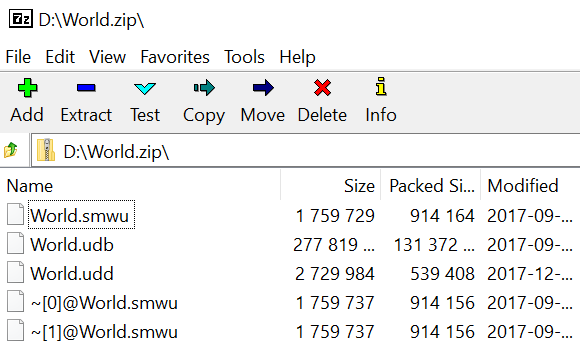
1. Compress the workspace and datasources of the data to a *.zip file shown below:
2.The myDatas resource is the collection of data in iPortal uploaded by the current user. To upload a file, first, you need to create a new data resource, that is, execute a POST request on http://localhost:8190/iportal/web/mycontent/datas.rjson, and the request entity should include the file name. The code is as follows:
var uploadTaskURL="";
var entry = {};
//The data file name to upload
entry.fileName = fileName;
//data type
entry.type = "WORKSPACE";
$.ajax({
url: rootUrl+'web/mycontent/datas.rjson?token='+ token,
method: "POST",
data: JSON.stringify(entry),
dataType : "json",
success: function(data){
alert("New created resource ID:" + data.childID);
submitFromDemo(data.childID,fileName);
$('#infoMassage').show();
},
error: function(data) {
$("#openDateButton").removeAttr("disabled");
alert("Failed to create the new resource");
}
});
3.The creating resource action will return a data item id, which is used to upload data. Execute a POST request on fileUpload resource with url:
http://localhost:8190/iportal/web/mycontent/datas/id/upload.rjson
The code is as follows:
var urlLoad = rootUrl + "web/mycontent/datas/"+id+"/upload.rjson?token=" + token;
$.ajaxFileUpload({
url:urlLoad,
dataType : "json",
method: "POST",
secureuri:false,
fileElementId:'fileSelect', // The id of the file input box
success: function(data){
$("#infoMassage").show();
$("#infoMassage").append("<p><strong style='color:red'>" + fileName + " Data upload successfully!</strong></p>");
$("#infoMassage").append("<p>Resource result: <a href='http://localhost:8190/iportal/web/mycontent/datas/"+id+".rjson?token="+ token +"' target='_blank'>http://localhost:8190/iportal/web/mycontent/datas/"+id+".rjson</a></p>");
$("#infoMassage").append("<p><input id='openDateButton' type='button' value='Whether to disclose the data' onclick='openDate("+ id +")'/><label id='openDateTxt'></label></p>");
},
error: function(data) {
}
});